Headless architecture in 30 seconds
- What it is: Your store's front end (what shoppers see) is split from the back end (products, orders, checkout). The two talk through an API.
- The catch: Headless is not an automatic speed or sales fix. Shopify's own Site Speed report puts 93% of Shopify brands on a fast storefront already, and published agency pricing for a headless build starts in the tens of thousands before monthly upkeep.
- Who it's for: Big Shopify and Shopify Plus brands with custom design needs, several brands or markets, and a real developer budget.
Agency pricing guides put headless Shopify builds anywhere from roughly $10,000 for a minimal Hydrogen project to $300,000+ for a full composable build, with post-launch retainers commonly quoted at $3,000 to $15,000 a month. Yet most Shopify stores already load fast. So is headless architecture a real upgrade for a big store, or a six-figure detour?
Below: what headless means on Shopify, what it costs, and where money really leaks. At the end, a 10-point scorecard helps you decide.
What Is Headless Commerce?
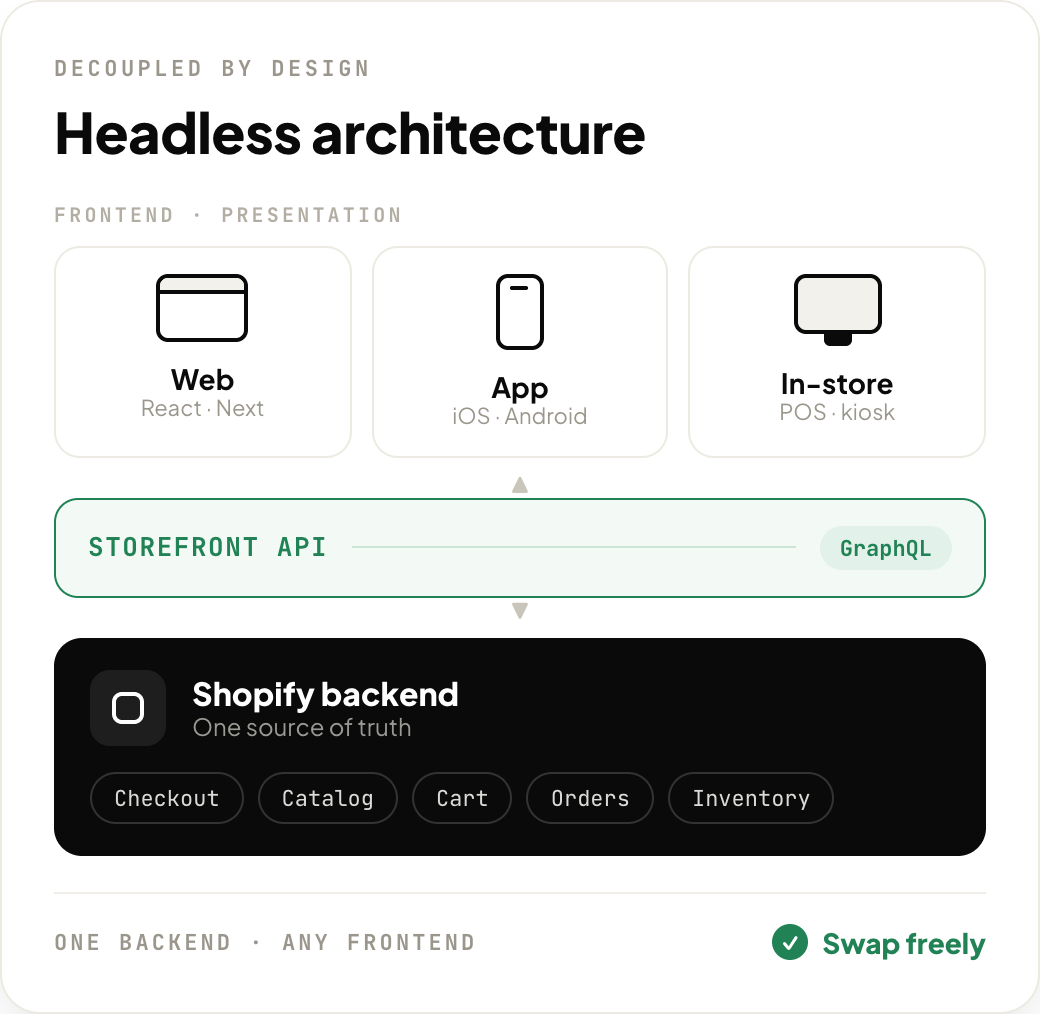
Headless commerce means your online store's front end and back end are two separate systems. The front end (the "head") is everything a shopper sees: pages, menus, photos, and buttons. The back end is the engine: products, prices, inventory, orders, and payments. The two connect through an API, which is a messenger that carries data between them.
Think of a restaurant. The back end is the kitchen and the front end is the dining room. A Shopify theme gives you both as one package. With headless commerce, you keep Shopify's kitchen and design your own dining room.
That is why a headless website can look like almost anything. No theme limits.
How Headless Architecture Works on Shopify
A headless Shopify store has four main layers.
| Layer | What it does | Common tools |
|---|---|---|
| Front end (storefront) | The pages shoppers see and click | Shopify Hydrogen, Next.js |
| API layer | Carries products, prices, and carts between front and back | Shopify Storefront API |
| Back end (commerce engine) | Products, inventory, orders, payments, checkout | Shopify or Shopify Plus admin |
| Content layer | Blog posts, lookbooks, landing pages | A headless CMS for ecommerce, such as Sanity, Contentful, or Storyblok |
Here is what happens when someone shops on a headless Shopify store:
- The storefront asks the Storefront API for product data.
- Shopify sends the data back, and the page shows it.
- The shopper adds items to the cart.
- At checkout, the shopper moves to Shopify's own checkout.
- The order lands in the same Shopify admin your team already uses.
MACH Architecture in Plain Words
Agencies often mention MACH architecture: Microservices, API-first, Cloud-native, and Headless. It means building a store from small parts that talk through APIs and run in the cloud. Headless is just the "H."
Headless vs Composable Commerce
Composable commerce goes further. You pick a separate tool for each job (search, reviews, content, loyalty) and plug them together. Headless splits front from back. Composable splits everything. Most Shopify brands that go headless keep Shopify as the core.
Headless Commerce vs Traditional Commerce
| Factor | Traditional Shopify (theme) | Headless Shopify |
|---|---|---|
| How it's built | A Liquid theme, edited in the theme editor | A custom front end built by developers |
| Design freedom | Good, within theme limits | Almost unlimited |
| Page speed | Fast if the theme is clean | Can be very fast, but only if built well |
| Apps | Most apps plug in with one click | Many apps need API work or a rebuild |
| Checkout | Shopify checkout | Still Shopify checkout |
| Who can edit pages | Marketers, no code needed | Usually needs a CMS or a developer |
| Time to launch | Days to weeks | Weeks for a lean build, months for complex ones |
| Ongoing cost | Low | A monthly developer retainer, commonly quoted in the thousands |
| Best for | Most stores | Large brands with unique needs |
Key takeaway: headless commerce trades simplicity for freedom. That trade only pays off if you will actually use the freedom.
Shopify Hydrogen and Oxygen Explained
Shopify Hydrogen is Shopify's own framework for building headless storefronts. According to the Shopify Dev Docs, Hydrogen is built on React Router, an open-source React framework, with ready-made parts for carts, products, and search.
Oxygen is Shopify's hosting for Hydrogen stores. It runs the storefront on servers around the world, close to shoppers. The same Shopify Dev Docs page lists Oxygen as available at no extra charge on paid Shopify plans — Starter, Basic, Grow, Advanced, Plus, and Pause and build — though it is not available on Agentic plans. Using it requires installing the Hydrogen sales channel on your store.
| Option | Built by | Hosting | Best for |
|---|---|---|---|
| Liquid theme | Shopify and theme makers | Included | Most stores |
| Hydrogen + Oxygen | Shopify | Included on paid plans | Brands that want headless and want to stay close to Shopify |
| Next.js or another framework | Open source | Vercel, Netlify, or your own servers (extra cost) | Teams that already know the stack |
Outerwear brand Nour Hammour told Shopify that Hydrogen "literally saved us months of custom development" (Shopify Enterprise Blog).
Shopify Plus Headless Commerce: What Changes for Big Stores
With Shopify Plus headless commerce (or any Shopify headless commerce setup), the back office barely changes. Your team still manages products, orders, and customers in Shopify admin. What changes is control over the shopping experience.
- Checkout stays on Shopify. Shoppers finish on Shopify's secure checkout, and Plus brands can still customize it with Shopify's own checkout tools.
- Many brands, one back end. Solo Brands runs Chubbies, Isle Surf, and Oru Kayak on one shared headless setup (Shopify Enterprise Blog).
- Many markets. One back end can feed separate storefronts by country, language, or currency.
- More channels. The same product data can power a website, a mobile app, and in-store screens. See our omnichannel marketing guide.
- More developer work. A five-minute banner change in the theme editor may now need a developer ticket.
Benefits of Headless Commerce
| Benefit | What it means | Who gains most |
|---|---|---|
| Total design freedom | Build any layout, animation, or interactive page | Fashion, luxury, and lifestyle brands |
| Speed potential | In a study by 55 and Deloitte commissioned by Google, a 0.1-second faster mobile site lifted retail conversions by 8.4% and spending by 9.2% (web.dev) | High-traffic stores |
| Content-led selling | Mix stories, video, and shopping on one page | Brands with strong campaigns |
| One back end, many front ends | Web, app, and in-store screens share the same data | Omnichannel and multi-brand groups |
| Faster redesigns | Change the storefront without touching orders or payments | Brands that redesign often |
These gains come from better design and content, not from headless on its own. A better buying experience is the real goal (see our ecommerce customer experience guide).
Before you price a rebuild: check what your store already loses after the click. The free Kovax ROI calculator estimates the revenue lost to abandoned checkouts and missed calls, using your own order value.
The Real Cost of Going Headless
This is where most brands get surprised. The build is only the first bill.
| Cost item | Theme store | Headless store |
|---|---|---|
| Storefront build | Free, or a one-time paid theme plus setup | Roughly $10K at the lean end, $80K to $300K+ for mid-market and enterprise scope |
| Hosting | Included | Oxygen included on paid plans. Other hosts cost extra |
| Content tools | Theme editor included | Headless CMS, from a free tier to several hundred dollars a month |
| Developer upkeep | Low | Post-launch retainers commonly quoted at $3K to $15K a month |
| Time to launch | Days to weeks | Weeks for a lean build, several months for complex ones |
Build and retainer ranges are drawn from published 2026 agency pricing guides, which vary widely — one guide flags any full headless quote under $50,000 as worth scrutinising. Always get quotes for your own scope.
Hidden Costs to Plan For
- App rebuilds. Many Shopify apps add features through theme blocks. On a headless storefront those blocks don't show up, so review widgets, upsell blocks, or loyalty pop-ups may need API work or a different app (see the best Shopify apps for 2026).
- SEO migration. Redirects, meta tags, structured data, and sitemaps must be rebuilt by hand.
- Two systems to maintain. Shopify releases new API versions every quarter, so the storefront code needs regular updates too.
Simple math (example): a $50,000 build plus $4,500 a month in tools and engineering comes to about $104,000 in year one. At a 50% gross margin, a store needs roughly $208,000 in extra yearly sales just to break even on headless.
Is Headless Architecture Worth It? A 10-Point Scorecard
This scorecard is our own rule of thumb, built from the trade-offs above. Answer each question with yes or no. Give yourself 1 point for every yes.
| # | Question |
|---|---|
| 1 | Are you on Shopify Plus, or doing several million dollars a year online? |
| 2 | Have you hit a design or feature your theme truly can't do, even with custom sections? |
| 3 | Do you have in-house developers or a retained dev partner? |
| 4 | Can you spend $25K+ on a build without cutting your ad or inventory budget? |
| 5 | Can you cover developer costs every month after launch? |
| 6 | Do you run several brands, countries, or channels from one back end? |
| 7 | Does rich content (lookbooks, video, stories) drive a big share of your sales? |
| 8 | Is your site still slow after removing unused apps and cleaning up the theme? |
| 9 | Do your must-have apps offer APIs or headless support? |
| 10 | Can you wait 2 to 4 months for launch? |
| Score | Recommendation |
|---|---|
| 0 to 3 | Stay on a theme. Fix speed, apps, and content first. |
| 4 to 6 | Try a hybrid. Keep your theme and build one headless piece, like a campaign microsite or lookbook, to test the value. |
| 7 to 10 | Headless is a strong fit. Start with a discovery phase and a clear list of must-have features. |
Before deciding, write down your current conversion rate, page speed, and revenue per visitor (here are the ecommerce KPIs to track). Without a baseline, you will never know if headless paid off.
Real Headless Shopify Examples
| Brand | What they built | Result (as reported by Shopify) |
|---|---|---|
| Nour Hammour | A shoppable editorial lookbook on Hydrogen | +63% conversion rate, +128% sales year over year |
| Patta x Tommy | A rich store with animation and HD video on Hydrogen | Core store functions built in two weeks |
| Solo Brands | One headless setup for Chubbies, Isle Surf, Oru Kayak, and more | Fast storefronts for thousands of products |
Source: Shopify Enterprise Blog, Headless Commerce Examples.
Each of these headless Shopify brands had a specific experience a theme could not deliver. None of them went headless just because it was trendy.
What Headless Won't Fix: Revenue Lost After the Click
A new storefront changes how shoppers browse. It does not change what happens when they abandon checkout or call with a question. Those moments leak revenue on any storefront.
Here is what we have seen at Kovax, where we build AI voice and WhatsApp agents for Shopify brands. These numbers come from our own published customer case studies:
| Brand | Before | After |
|---|---|---|
| Monster Piercing (UK, body jewelry) | Email recovered 8% of abandoned checkouts | 19% recovered with an AI voice call plus WhatsApp follow-up (2.4x) |
| eSkinStore (Canada, ships to 20+ countries) | One support person, after-hours calls went to voicemail | 100% answer rate, 400+ calls a month, CAD 31K+ in at-risk orders protected |
| Eeveve (baby and kids) | $4,000 a month on phone support staff | Cost per call down from $26.67 to under $4 |
Mini-case: Monster Piercing
- Before: a team member chased abandoned carts by hand. Email brought back 8% of carts.
- Friction: shoppers left checkout over simple doubts, like "is this safe for sensitive skin?", and an email could not answer in the moment.
- After: an AI voice agent called first, and WhatsApp picked up the conversation from there.
- Result: recovery rose to 19%, a 2.4x lift, and 8 of 12 calls converted. The founder called it a "clear jump in conversions and immediate ROI without extra support staff." Read the full Monster Piercing case study.
The lesson for headless decisions: Monster Piercing more than doubled recovered checkouts without rebuilding a single page. Fix the leaks after the click (see how abandoned cart recovery and a 24/7 AI support agent work) before you spend $50,000 on the storefront.
Common Mistakes When Going Headless
- Going headless to fix speed. Slow Shopify stores are often slowed by too many apps and heavy images. Shopify's Site Speed report puts 93% of Shopify brands on a fast storefront already. Clean up first.
- Forgetting about apps. List every app you use and check how each one works headless before signing a contract.
- Skipping SEO planning. Missing redirects can wipe out rankings that took years to build.
Frequently Asked Questions
What is headless architecture in ecommerce?
Headless architecture separates the storefront shoppers see from the back end that runs products, orders, and payments. The two connect through an API, so a brand can design freely while keeping the same commerce engine.
Is headless Shopify worth it for small stores?
Usually not. A clean, fast theme gives small stores most of the benefits at a fraction of the cost. Headless fits large brands with developers and budget for monthly upkeep.
How much does a headless Shopify store cost?
Published agency pricing guides put builds at roughly $10,000 for a minimal Hydrogen project, rising to $80,000 to $300,000 or more for mid-market and enterprise scope, plus monthly developer and tool costs.
Do Shopify apps work on a headless store?
Apps that work inside Shopify admin, like order and inventory tools, keep working. Apps that add features to the theme, like review widgets or pop-ups, often need API work or a replacement.
Is headless commerce better for SEO?
Not by default. Speed and clean structure help SEO, but redirects, meta tags, structured data, and sitemaps must be rebuilt by hand. Mistakes can cost rankings.
What is the difference between headless and composable commerce?
Headless commerce splits the front end from the back end. Composable commerce goes further and splits the back end too, so each job, like search or reviews, uses its own tool connected by APIs.
Conclusion: Should Your Store Go Headless?
Headless architecture pays off when a big brand has an experience its theme can't deliver, a team to maintain it, and budget to wait for results. For most stores, a clean, fast theme with fewer apps gets most of the way for far less.
Run the scorecard and get two or three agency quotes before you commit. Whatever storefront you choose, fix the revenue you lose after the click. See how eSkinStore protected CAD 31K+ in at-risk orders in the eSkinStore case study.
Install Kovax from the Shopify App Store or book a demo.
Related reading: Abandoned cart recovery guide · Omnichannel marketing · Ecommerce customer experience · Ecommerce KPIs · Eeveve case study