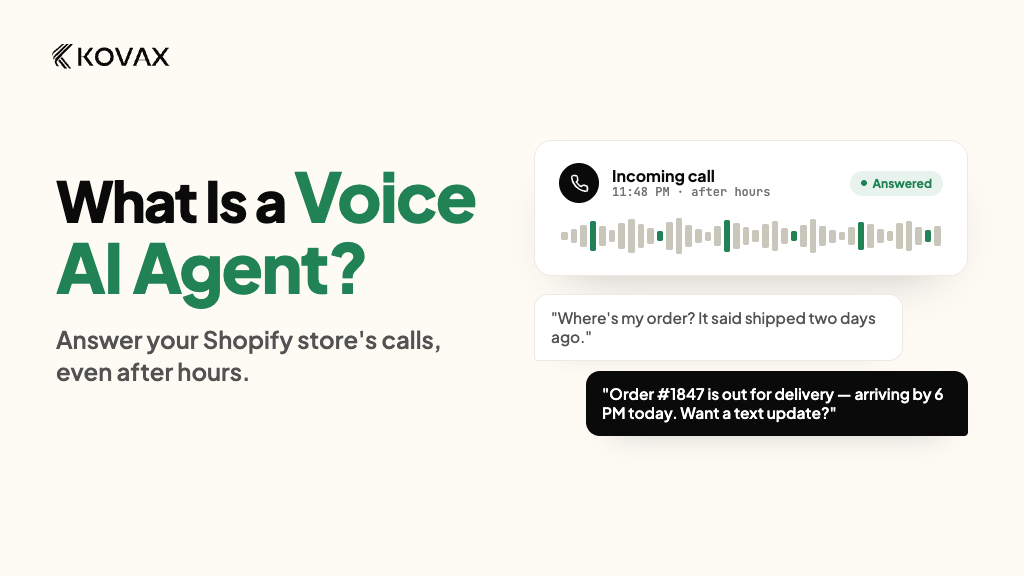
It is 9 p.m. and a customer calls your store to ask where their order is. Nobody picks up. They send an email, wait a day, and some of them file a dispute instead.
A voice AI agent answers that call. It is software that talks with customers by phone, looks up your Shopify data, and finishes the task. It can take inbound calls when customers reach you, and place outbound calls when you reach them, such as a cart reminder.
This guide shows what a call sounds like, how the agent works, what it can do for a store, where it falls short, and how to test one before customers hear it. The examples come from a typical Shopify store. Details about Kovax come from Kovax's own product pages, and you can see the product itself on the Kovax AI voice agents page.
What does a voice AI agent call sound like?
Seeing a call is faster than reading a definition. The dialogue below is an illustrative example based on the order-status flow Kovax describes. It is not a recording from a real store.
Agent: Hi Jordan, this is the store's AI assistant. I can see your recent order. Are you calling about that one?
Caller: Yes. Where is it? I placed it on Monday.
Agent: It shipped yesterday and the tracking shows it is in transit. Would you like the expected delivery date?
Caller: Yes please. And can I change the delivery address?
Agent: Since the order has already shipped, I cannot change the address myself. A team member can look at options. Nobody is available right now, so I have logged your request against your order, and the team will follow up in the morning.
Here is what to notice:
- It knew who was calling. Kovax says it matches the caller ID to the Shopify customer record, so the agent knows the last order before it speaks.
- It used real order data. The tracking answer came from the store, not from a guess.
- It said it was an AI. The caller was never misled.
- It stayed inside its limits. It did not promise an address change it could not make.
- Nothing was lost. The request was logged against the order for a person to pick up. Kovax says calls that need a person are transferred with a summary, and when nobody is available the request is captured and logged.
What is a voice AI agent, and how does it work?
A voice AI agent is software that answers or places phone calls and holds the conversation itself. It listens to the caller, decides what to say or do next, takes action in your systems, and speaks the reply out loud in real time.
Every call follows the same four steps, and they happen in a fraction of a second:
- Listen. Speech recognition turns the caller's words into text.
- Understand. A language model works out what the caller wants, even when the phrasing is unusual.
- Act. The agent looks up data or runs a task, such as finding an order or checking return eligibility.
- Reply. Text-to-speech turns the answer into spoken words.
A few extras keep the call smooth. The agent keeps context, so "that order" still points to the right order two sentences later. It decides when the caller has finished speaking, so it does not talk over them.
On outbound calls it also has to spot voicemail greetings and phone menus. Kovax says its agent hangs up when it detects voicemail or an automated menu, instead of talking to a machine.
Speed matters more than most people expect. A slow agent feels broken even when its answers are right, because phone callers expect a reply almost at once.
Where does the agent get its answers?
From your store. When a voice AI agent connects to Shopify, it can read the information a support person would look at:
- Order status, tracking, and delivery updates
- Product details and stock availability
- Customer order history
- Your shipping and return policies
Kovax says its agent searches the catalog, pulls the customer's last order, and answers policy questions from store data during the call. It also says calls, WhatsApp replies, and messages share one customer view and one Shopify order history. You can check the apps and tools it connects with on the Kovax integrations page.
This matters because a made-up answer on a phone call is worse than no answer. If an agent guesses a delivery date and gets it wrong, you now have an upset customer and a support ticket. Real data, plus your own rules for shipping times and return windows, is what makes an answer safe to give.
What can a voice AI agent do for your store?
The best way to judge a voice AI agent is by what changes for your customers and your team. Here are the outcomes most Shopify stores care about, each with the reason it matters. You can also browse the full list of Kovax use cases.
Answer routine questions in a single call
What it does. The agent handles the questions your team answers over and over: where an order is, what the return policy says, whether an item is in stock, and how long shipping takes. Kovax lists order tracking, product questions, and returns among the topics its agent handles, and offers a support and tracking solution built around "where is my order" calls.
Why it matters. The caller gets an answer without a ticket, an email thread, or a callback. Your team stops spending the day on questions that have one correct answer.
Set the limits in advance. For example, let the agent check return eligibility on its own, but send refunds above a set amount to a person. Also decide what the agent says when the answer is no. A clear, polite explanation of your return window beats a vague reply.
Cover the hours you cannot staff
What it does. An agent does not have off hours. It can pick up at 9 p.m. on a Sunday as easily as at noon on a Tuesday, and it can handle many calls at the same time. Kovax says its agent supports 20+ languages and places outbound calls from a local number, which Kovax says helps pickup. Local numbers include +1 numbers for the US.
Why it matters. Stores that sell across time zones, or whose shoppers call in the evening when something goes wrong, stop sending those callers to voicemail. During a sale or a shipping delay, the simple calls do not pile up in a queue while your staff handle the hard ones.
Win back carts before shoppers move on
What it does. Most stores recover carts with email or text. A short phone call can reach shoppers who never reply to either. Kovax says its abandoned cart recovery calls the shopper within minutes of leaving checkout, handles hesitation, and sends a checkout link by message during the call. Kovax also says discounts are optional, and the merchant sets the limits.
Why it matters. A cart is a shopper who already wanted the product. A fast, polite call can answer the one question that stopped them, such as shipping time, before they move on.
Here is an illustrative example for a shopper who agreed to receive calls:
Agent: Hi, this is the AI assistant for the store, calling for Jordan. Is now a good time for a quick question?
Caller: Sure.
Agent: You left a jacket in your cart earlier. Did you run into any trouble at checkout, or do you have a question I can answer?
Caller: I was not sure about shipping time.
Agent: Standard shipping takes the time listed on your cart page. I can text you the checkout link so you can finish when you are ready.
For evidence, look at one published store example. In its abandoned cart case study, Kovax reports that Monster Piercing, a UK body jewellery brand, recovered 19% of carts using an AI voice call followed by WhatsApp, compared with 8% by email. These figures come from Kovax, and the page does not state the time period. Treat them as one store's result, not a promise for every store.
Outbound calls also come with legal rules in the US. The section on consent below explains them.
Hand hard cases to your team with context
What it does. No voice AI agent should try to handle everything. Kovax says that when a call needs a person, it is transferred with a summary of the conversation so far, which Kovax calls a warm transfer. Kovax also says a flow can move to WhatsApp, SMS, or email if nobody picks up. Kovax's customer service agent page shows how this fits into a support setup, and its WhatsApp marketing page covers the messaging side.
Why it matters. The customer does not have to repeat themselves, and your team starts with context instead of a cold call.
See what happened on every call
What it does. Kovax says each call gets a recording, a transcript, a success evaluation, and a cost.
Why it matters. You cannot improve what you cannot hear. Reviewing real calls is how you find gaps in your policies and fix them.
What should you check before you pick one?
Demos sound great. Real calls are harder. Test these five things before you commit:
- Speed. Is there a noticeable pause before the agent replies?
- Shopify connection. Can it read live order data, or only a static FAQ?
- Accents and languages. Try different voices, and ask which languages it supports. If your customers speak Spanish, test it directly.
- Handoff. Does a person get the summary, and how fast? What happens when nobody is available?
- Recording and consent. Can you add disclosures and control what is stored?
If you are comparing tools, the Kovax comparison page puts Kovax next to other platforms.
How do you set up a voice AI agent and test it?
Setup differs by provider. Kovax describes three steps: install the app from the Shopify App Store, let the agent learn your products, policies, and brand tone from your store data, then go live. Kovax says the voice agent goes live in minutes. You can read the walkthrough on its how it works page.
Fast setup is not the same as a finished setup. Plan time for these steps:
- Pick one use case. Start with order status or after-hours calls.
- Check your policies. Make sure shipping times, return rules, and business hours are clear and current. The agent can only be as clear as your rules.
- Set handoff rules. Decide when the agent transfers, and to whom.
- Choose the greeting. Keep it short and say it is an AI.
- Test it yourself. Then roll out to a small group and review real calls before you expand.
Run a pilot on your own call types. Do not rely on a vendor's demo script:
- Call with a real order number, then with a wrong one
- Ask the same question three different ways
- Interrupt the agent mid-sentence
- Ask for something it should refuse, like a large refund
- Ask for a human and see how fast the transfer works
- Have a teammate with a different accent call too
Write down every call that went wrong and why. Fix your policies or settings, then test again.
After launch, check a few simple numbers each week. Are fewer calls going to voicemail? How many calls ended with the caller's problem solved? How often did the agent pass a call to your team? Do callers call back about the same issue? Listen to a sample of calls every week, especially the ones that were handed off.
When should a person take the call?
Set clear triggers for handoff before launch:
- The caller asks for a person
- The caller sounds upset
- The request is outside the agent's rules
- The agent is not confident in the answer
Decide where the call goes. During business hours, it might transfer to a team member. After hours, it might take a message and create a follow-up for the morning.
Where is a voice AI agent the wrong tool?
It does not fit every store or every call.
- Very low call volume. If you get a handful of calls a week, voicemail and a callback routine may be enough.
- Emotional or complex complaints. A person should handle these.
- High-stakes decisions. Large refunds, fraud, and legal threats need human judgment.
- Messy store data. If your order data or policies are unclear, the agent will repeat the mess.
If any of these describe your store, fix the basics first, or start with a narrow use case.
What should you know about consent, recording, and customer data?
Outbound calls need consent. In February 2024 the FCC ruled that calls using AI-generated voices count as an "artificial or prerecorded voice" under the TCPA, so callers need consent first. You can read the FCC's own summary of the ruling on its website. Marketing calls generally need prior express written consent, and the call must identify who is calling.
In plain terms, only call shoppers who agreed to be called. Kovax's cart recovery page does not cover consent, so ask any provider, Kovax included, how consent is captured and recorded. This is general information, not legal advice, so check with a lawyer before you launch outbound calls.
Recording rules vary by state. US federal law requires at least one party's consent to record a call, but several states, including California, Florida, Illinois, and Washington, require everyone's. Your customers can be anywhere in the country, so the safest habit is to tell every caller that the call may be recorded.
Know where customer data goes. A voice AI agent will hear names, phone numbers, addresses, and order details. Ask your provider:
- What call data is stored, and for how long?
- Who can listen to recordings or read transcripts?
- Can you delete a customer's data on request?
- Does the agent collect payment details, and if so, how?
As a simple rule, keep card numbers out of the call unless your provider has a secure, compliant way to handle them. Many stores let the agent send a checkout link instead.
Frequently asked questions
How is a voice AI agent different from a phone menu or a chatbot?
| Phone menu (IVR) | Chatbot | Answering service | Voice AI agent | |
|---|---|---|---|---|
| How the customer interacts | Presses keys | Types | Talks to a person | Speaks naturally |
| Handles open questions | No | Yes | Yes | Yes |
| Works on a phone call | Yes | No | Yes | Yes |
| Takes action in your store | Rarely | Sometimes | Rarely | Yes, when connected |
| Works at any hour | Yes | Yes | Depends on plan | Yes |
A phone menu follows fixed paths and frustrates people who do not fit them. A chatbot lives in text, so it misses customers who prefer to call. A traditional answering service takes messages, but the person answering usually cannot look at your orders. A voice AI agent combines the phone channel with real store data and the ability to act.
Can a voice AI agent make outbound calls?
Yes. Kovax says one agent handles both inbound and outbound calls using the same Shopify data. In the US, outbound calls with AI voices need proper consent under the TCPA, so confirm your rules first.
Will customers know they are talking to AI?
They should. Say it at the start of every call. Clear disclosure builds trust and supports compliance. Most callers do not mind an AI when it solves the problem quickly. They mind when the agent pretends to be human or gets stuck in a loop.
How much does a voice AI agent cost?
It varies by provider, and pricing is often usage-based, so the main cost is the number of call minutes. Some plans add a platform fee, and some charge extra for phone numbers or outbound calling.
Here is an illustrative example. If your agent handles 400 minutes of calls in a month on a plan that charges 10 cents per minute, the usage cost is $40 before any other fees. Your numbers will differ.
Kovax says its app is free to install and includes a starter allowance of calls. For current plans, see the Kovax pricing page. To compare plans fairly, estimate your monthly call minutes, then add platform fees, phone number costs, and setup charges. Ask what happens if you go over your minutes.
Is a voice AI agent better than hiring a support person?
They solve different problems. A support person is better at judgment, empathy, and unusual cases. A voice AI agent is better at repeating routine tasks at any hour, without breaks. For many stores, the best setup uses both. The agent handles the simple calls and hands the hard ones to your team with notes.
Can a voice AI agent work with WhatsApp?
Some can. Kovax says calls, WhatsApp, and other messages share one customer view, so a store can pick the channel that fits each customer. A caller might prefer a quick phone call, while someone else would rather get an update by message. Using more than one channel also gives you a backup if a customer does not pick up.
What mistakes should you avoid?
- Launching every use case at once. Start small.
- Skipping the policy step. An agent without clear rules will guess.
- Hiding that it is an AI. Say it at the start.
- No easy way to reach a person. Callers get angry when they cannot escape.
- Never reviewing calls. The first weeks teach you the most.
- Calling people without consent. This can bring legal trouble.
What should you read next?
If you want to keep going, these Kovax guides cover nearby topics:
- AI Shopping Assistants: 7 Best Tools for Shopify Stores in 2026
- AI Cold Calling for Ecommerce
- Kovax case studies
Hear a voice AI agent handle your store's calls
The fastest way to judge a voice AI agent is to hear it handle your own calls. Book a demo with the Kovax team and hear how it would answer your order and return questions: https://cal.com/kovax.ai/kovax-ai-call-voice-phone